PPP 和 PPPoE 介紹
PPP 和 PPPoE 介紹的重點整理。
PPP (Point to Point)
PPP簡述
- PPP協定是目前最廣泛的廣域網點對點封裝協議之一
- 能控制數據鏈路的建立
- 能夠對IP地址進行分配和使用
- 支持多種網路協定
- 能夠設定和測試數據鏈路
- 能夠進行錯誤檢測
- 提供身分驗證
- 有協商選項,能夠對網路層的地址和數據進行壓等進行協商
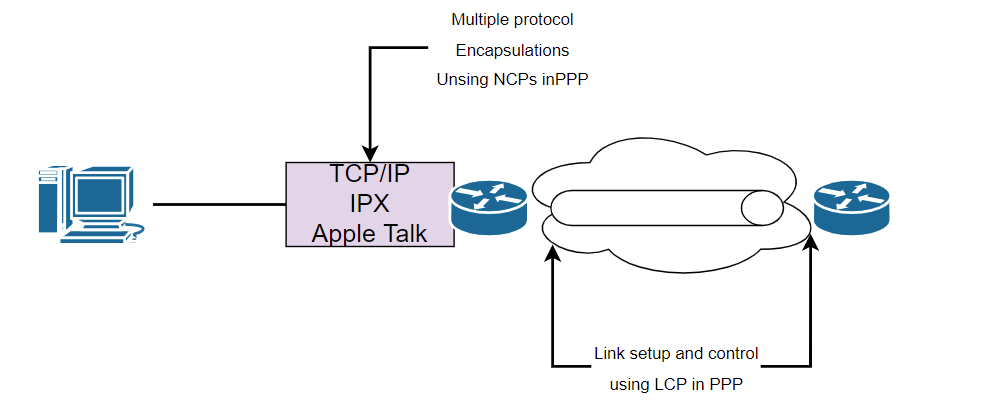
PPP的層次結構
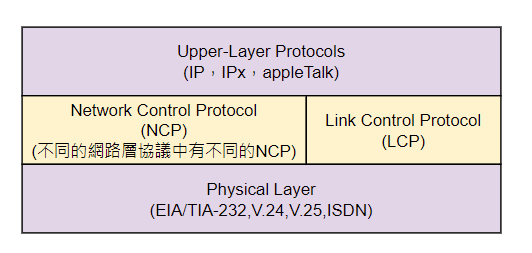
PPP的組件
-
鏈路控制協議LCP(Link Control Protocol)
LCP負責創建,維護或終止一條鏈路數據
-
NCP (Network Control Protocol)
NCP是一個協議族,負責解決物理連接上運行什麼望路協定,以及解決上層網路協議發生的問題
-
認證協定
PAP(Password Authentication Protocol) (單向的)
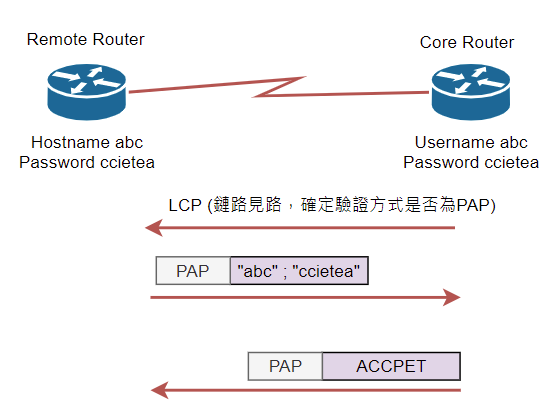
- 已明文的方式
CHAP(Challenge-Handshake Authentication Protocol) (單向)
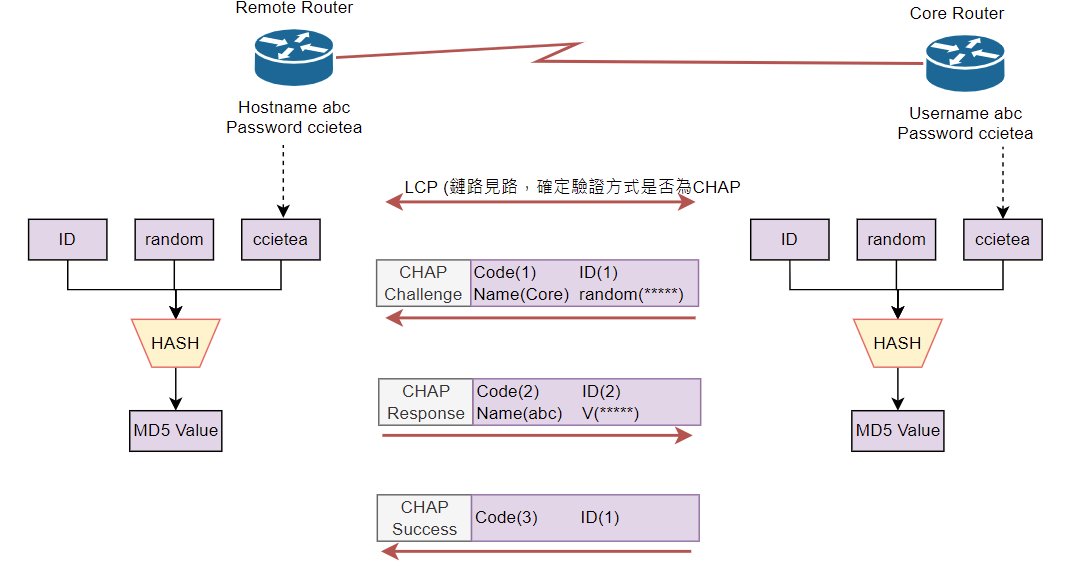
PPP建立會話
-
鏈路的建立和配置協商
通信的發起方傳送LCP Frame來配置和檢測數據鏈路,並檢查是否要驗證
-
鏈路質量檢測,認證階段(可選)
判斷線路的質量是否能攜帶網路訊息,如果使用身分驗證的話,那麼驗證在這步驟發生
-
網路層協定的配置協商
通信的發起方發送NCP frame用以選擇和配置網路層的協定,配置完畢,通信雙方可以發送各自的網路層協定數據組分組
PPP設定
設定封裝
IOU1(config-if)#encapsulation ppp
IOU1(config-if)#do sh int s0/0

Serial0/0 is up, line protocol is up
  Hardware is M4T
  Internet address is 10.1.1.1/24
  MTU 1500 bytes, BW 1544 Kbit/sec, DLY 20000 usec,
     reliability 255/255, txload 1/255, rxload 1/255
  Encapsulation PPP, LCP Open
  Open: IPCP, CDPCP, crc 16, loopback not set
  Keepalive set (10 sec)
  Restart-Delay is 0 secs
  Last input 00:00:04, output 00:00:03, output hang never
  Last clearing of "show interface" counters 00:00:08
  Input queue: 0/75/0/0 (size/max/drops/flushes); Total output drops: 0
  Queueing strategy: fifo
  Output queue: 0/40 (size/max)
  5 minute input rate 0 bits/sec, 0 packets/sec
  5 minute output rate 0 bits/sec, 0 packets/sec
     8 packets input, 425 bytes, 0 no buffer
     Received 0 broadcasts (0 IP multicasts)
     0 runts, 0 giants, 0 throttles
     0 input errors, 0 CRC, 0 frame, 0 overrun, 0 ignored, 0 abort
     8 packets output, 762 bytes, 0 underruns
     0 output errors, 0 collisions, 0 interface resets
     0 unknown protocol drops
     0 output buffer failures, 0 output buffers swapped out
     0 carrier transitions     DCD=up  DSR=up  DTR=up  RTS=up  CTS=up
PAP
-
單向認證
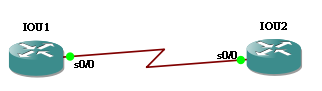
IOU1(config)#int s0/0
IOU1(config-if)#encapsulation ppp
IOU1(config-if)#ip addr 192.168.12.1 255.255.255.0
IOU1(config-if)#ppp pap sent-username remote password ccie
IOU2(config)#username remote password ccie IOU2(config)#int s0/0 IOU2(config-if)#encapsulation ppp IOU2(config-if)#ip address 192.168.12.2 255.255.255.0 IOU2(config-if)#ppp authentication pap -
雙向
IOU2(config)#username IOU2 password ccie
IOU2(config)#int s0/0
IOU2(config-if)#encapsulation ppp
IOU2(config-if)#ip address 192.168.12.1 255.255.255.0
IOU2(config-if)#ppp authentication pap
IOU2(config-if)#ppp pap sent-username IOU1 password ccie
IOU2(config)#username IOU1 password ccie IOU2(config)#int s0/0 IOU2(config-if)#encapsulation ppp IOU2(config-if)#ip address 192.168.12.2 255.255.255.0 IOU2(config-if)#ppp authentication pap IOU2(config-if)#ppp pap sent-username IOU2 password ccie
CHAP
-
單向認證
IOU1(config)#int s0/0
IOU1(config-if)#encapsulation ppp
IOU1(config-if)#ip addr 192.168.12.1 255.255.255.0
IOU1(config-if)#ppp chap hostname IOU1
IOU1(config-if)#ppp chap password ccie
!驗證方 IOU2(config)#username IOU1 password ccie IOU2(config)#int s0/0 IOU2(config-if)#encapsulation ppp IOU2(config-if)#ip address 192.168.12.2 255.255.255.0 IOU2(config-if)#ppp authentication chapIOU1#sh ppp packet -
雙向認證
IOU1(config)#username IOU2 password cisco
IOU1(config)#int s0/0
IOU1(config-if)#encapsulation ppp
IOU1(config-if)#ppp authentication chap
IOU2(config)#username IOU1 password cisco IOU2(config)#int s0/0 IOU2(config-if)#encapsulation ppp IOU2(config-if)#ppp authentication chap
PPPoE (Point to Point protocol over Ethernet)
PPPoE概述
在Ethernet上乘載ppp protocol,他利用ethernet將大量主機組成網路,通過一個遠端接入的設備連上internet,並接入每一個主機實現控制,計費的功能。
PPPoE 協議分為三個階段
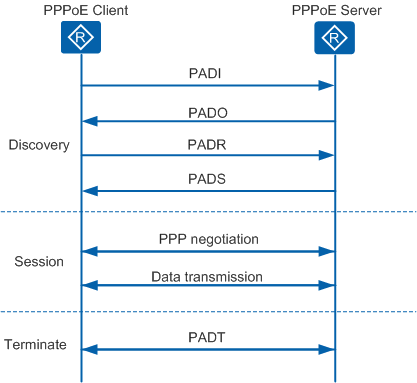
PPPoE Discovery Stage
- PPPoE Client廣播發送一個PADI(PPPoE Active Discovery Initiation)封包,在此封包中包含了PPPoE Client想要得到的服務類型
- 所有的PPPoE server收到PADI封包之後,將其中請求的服務與自己能夠提供的服務進行比對,如果可以提供則回覆一個PADO (PPPoE active Disvcovery Offer)封包
- PPPoE Client可能收到多個PPPoE server發送的PADO封包,PPPoE Client選擇最先收到的PADO封包對應的PPPoE server最為自己的PPPoE server,並單播發送一個PADR(PPPoE Active Discovery Request)封包。
- PPPoE Server產生一個Session ID,標示和PPPoE Client的這個Session,通過發送一個PADS封包把Session ID發送給PPPoE Client,Session建立後進入PPPoE Session Stage,PADS(PPPoE active Discovery Session-confirmation)
PPPoE Session Stage
- 此階段可以分成兩個階段一個是PPP negotiation,PPP封包傳輸階段
- PPPoE Session與PPP協商一樣的方式,可以劃分成LCP、認證、NCP三個階段
- LCP階段主要完成建立,配置和檢測數據連線
- LCP協商完成後,開始進行認證,認證協議類型LCP協商結果決定
- 如果驗證成功,PPP進入NCP,NCP用於配置不同的Netowrk layer的協定
- NCP常用的協定是IPCP (IP control Proto),負責匹配用戶的IP和DNS
- PPPoE Sessoin完成後,其就可以乘載PPP data packet
PPPoE Session都是以單播的方式
PPPoE Terminate Stage
- PADT
PPPoE設定
-
R1 PPPoE Client
-
設定dial介面,如果設定NAT要使用這個介面
interface dialer 1 ip address negotiated /--如果是買固定ip就使用固定IP的設定方式--/ ip mtu 1492 encapsulation ppp dialer pool 1 ppp chap hostname R1 ppp chap password cisco -
物理介面引入
int e0/0
	pppoe enable group global
	pppoe-client dial-pool-number 1
	no ipo address
	no shutdown
-
-
PPPoE Server
-
設定帳號密碼
username R1 password cisco 基本會使用AAA server ip local pool PPPOE 12.1.1.1 -
創建虛擬模板用於撥號
interface virtual-template1 ip unnumbered e0/0 借用e0/0的地址 ip mtu 1492 /-- PPP 8 byte 所以需要1500-8 --/ peer default ip address pool PPPOE /--PPPOE 為對端分發address pool PPPoE中的IP--/ ppp authentication chap -
關連到dial group
bba-group pppoe CCIE 開啟PPPoE dial group CCIE virtual-template 1 將虛擬模板1加載到dial group -
關連到物理界面
interface e0/0
	ip addr 12.1.1.2 255.255.255.0
	pppoe enable group CCIE    /--將物理界面映射到PPPOE dial group,
	這樣從該介面進入的封包就會調用該dial group--/
	no sh
-
show
show pppoe session
-