HDLC 介紹
HDLC 介紹的重點整理。
概念
- 專線線路在數據鏈路層一般採用HDLC或是PPP封裝
- 專線線路是一條永久的點對點線路
- HDLC(High-level Data Link Control)高級數據鏈路控制協議是一種在同步鏈路上船數據的二層協定
- HDLC由SDLC發展而來
- 每個廠家的HDLC可能有所不同,因此不同廠家之間的HDLC未必能夠兼容
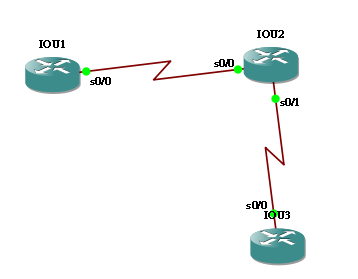
HDLC封裝


HDLC設定
Cisco 預設就是使用HDLC
IOU1#sh int s0/0
Serial0/0 is administratively down, line protocol is down
  Hardware is M4T
  MTU 1500 bytes, BW 1544 Kbit/sec, DLY 20000 usec,
     reliability 255/255, txload 1/255, rxload 1/255
  Encapsulation HDLC, crc 16, loopback not set
  Keepalive set (10 sec)
  Restart-Delay is 0 secs
  Last input never, output never, output hang never
  Last clearing of "show interface" counters never
  Input queue: 0/75/0/0 (size/max/drops/flushes); Total output drops: 0
  Queueing strategy: fifo
  Output queue: 0/40 (size/max)
  5 minute input rate 0 bits/sec, 0 packets/sec
  5 minute output rate 0 bits/sec, 0 packets/sec
     0 packets input, 0 bytes, 0 no buffer
     Received 0 broadcasts (0 IP multicasts)
     0 runts, 0 giants, 0 throttles
     0 input errors, 0 CRC, 0 frame, 0 overrun, 0 ignored, 0 abort
     0 packets output, 0 bytes, 0 underruns
     0 output errors, 0 collisions, 0 interface resets
     0 unknown protocol drops
     0 output buffer failures, 0 output buffers swapped out
     1 carrier transitions     DCD=up  DSR=up  DTR=down  RTS=down  CTS=up
只要簡單的這樣就可使Cisco HDLC啟動
IOU1(config)#int s0/0
IOU1(config-if)#ip addr 10.1.1.1 255.255.255.0

IOU2(config)#int s0/0
IOU2(config-if)#ip addr 10.1.1.2 255.255.255.0
打開HDLC封裝
IOU2(config-if)#encapsulation hdlc