GRE 與 IPSec 隧道技術指南
GRE 與 IPSec 隧道技術指南的重點整理。
GRE Over IPSec
理論概念
GRE Over IPSec 是把 IPSec 在最外面,意思就是在 R1 和 R2 建立 IPSec tunnel,把 GRE tunnel 加密。Routing Protocol 在 GRE Tunnel 裡面完成 Route 交換,最後 Data 在 GRE Tunnel 裡面傳送,所以 Routing Protocol 和 Data 都會被加密。
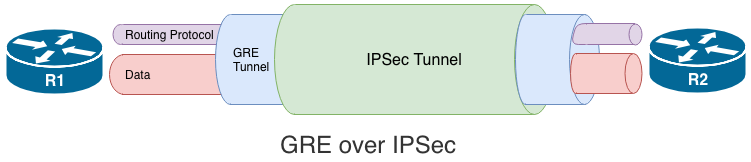
重要概念 GRE Over IPSec 是用實體網卡的 IP 來建立 GRE Over IPSec,因為底層的要在下面所以滿合理的
網路拓撲

設定步驟
1. 基本 IP 設定
R1 設定
R1(config)#interface loopback0
R1(config-if)#ip address 1.1.1.1 255.255.255.0
R1(config)#interface ethernet1/0
R1(config-if)#ip address 192.168.13.1 255.255.255.0
R3 設定
R3(config)#interface ethernet1/0
R3(config-if)#ip address 192.168.13.3 255.255.255.0
R3(config)#interface ethernet1/1
R3(config-if)#ip address 192.168.23.3 255.255.255.0
R2 設定
R2(config)#interface loopback0
R2(config-if)#ip address 2.2.2.2 255.255.255.0
R2(config)#interface ethernet1/0
R2(config-if)#ip address 192.168.23.2 255.255.255.0
2. IPSec 設定
Interesting Traffic 定義
# R1 設定
ip access-list extended IPSEC_TUNNEL
 permit ip host 192.168.13.1 host 192.168.23.2

# R2 設定
ip access-list extended IPSEC_TUNNEL
 permit ip host 192.168.23.2 host 192.168.13.1
重要提醒 從自己到目的地
IKE Phase 1 設定
# R1 設定
crypto isakmp policy 10
 encr aes
 authentication pre-share
 group 2

# R2 設定
crypto isakmp policy 10
 encr aes
 authentication pre-share
 group 2
IKE Phase 2 設定
# R1 設定
crypto ipsec transform-set TS esp-3des
 mode tunnel

# R2 設定
crypto ipsec transform-set TS esp-3des
 mode tunnel
Pre-shared Key 設定
# R1 設定
crypto isakmp key ccie address 192.168.23.2

# R2 設定
crypto isakmp key ccie address 192.168.13.1
Crypto Map 設定
# R1 設定
crypto map GRE_OVER_IPSEC 10 ipsec-isakmp
 set peer 192.168.23.2
 set transform-set TS
 match address IPSEC_TUNNEL

# R2 設定
crypto map GRE_OVER_IPSEC 10 ipsec-isakmp
 set peer 192.168.13.1
 set transform-set TS
 match address IPSEC_TUNNEL
介面套用
# R1 設定
interface ethernet1/0
 crypto map GRE_OVER_IPSEC

# R2 設定
interface ethernet1/0
 crypto map GRE_OVER_IPSEC
3. GRE Tunnel 設定
# R1 設定
interface Tunnel0
 ip address 172.16.12.1 255.255.255.0
 tunnel source Ethernet1/0
 tunnel destination 192.168.23.2

# R2 設定
interface Tunnel0
 ip address 172.16.12.2 255.255.255.0
 tunnel source Ethernet1/0
 tunnel destination 192.168.13.1
4. IGP 路由協定設定
# R1 設定
router eigrp 1
 network 1.1.1.0 0.0.0.255
 network 172.16.12.0 0.0.0.255

# R2 設定
router eigrp 1
 network 2.2.2.0 0.0.0.255
 network 172.16.12.0 0.0.0.255
IPSec Over GRE
理論概念
把 GRE 放在最外面,R1 與 R2 建立 GRE Tunnel,在 GRE Tunnel 裡面建立 IPSec。由於 IPSec 沒辦法支援組播,因此通常把 Routing Protocol 建立在 GRE tunnel 進行交換,沒有加密,只有在 Data 有經過 IPSec tunnel 加密。如堅持把 Routing 放入到 IPSec tunnel 中可以使用單播建立鄰居,如果這樣設定會很痛苦,因為要自己設定鄰居。

重要概念 IPSec Over GRE 是用 tunnel 的 IP 來建立 IPSec Over GRE,因為底層的要在下面所以滿合理的
設定步驟
設定順序
- 建立 GRE tunnel(還沒有加密)
- 設定 Routing Protocol
- IPSec interesting traffic
- IPSec 參數
- Interface crypto map
1. GRE Tunnel 設定
# R1 設定
interface Tunnel0
 ip address 172.16.12.1 255.255.255.0
 tunnel source Ethernet1/0
 tunnel destination 192.168.23.2

# R2 設定
interface Tunnel0
 ip address 172.16.12.2 255.255.255.0
 tunnel source Ethernet1/0
 tunnel destination 192.168.13.1
2. EIGRP 路由協定設定
# R1 設定
router eigrp 1
 network 1.1.1.0 0.0.0.255
 network 172.16.12.0 0.0.0.255

# R2 設定
router eigrp 1
 network 2.2.2.0 0.0.0.255
 network 172.16.12.0 0.0.0.255
3. IPSec Interesting Traffic
# R1 設定
ip access-list extended IPSEC_TUNNEL
 permit ip host 1.1.1.1 host 2.2.2.2

# R2 設定
ip access-list extended IPSEC_TUNNEL
 permit ip host 2.2.2.2 host 1.1.1.1
4. IPSec 參數設定
R1 設定
crypto isakmp policy 10
 encr aes
 authentication pre-share
 group 2
crypto isakmp key ccie address 172.16.12.2
crypto ipsec transform-set TS esp-3des
 mode tunnel
crypto map IPSEC_OVER_GRE 10 ipsec-isakmp
 set peer 172.16.12.2
 set transform-set TS
 match address IPSEC_TUNNEL
R2 設定
crypto isakmp policy 10
 encr aes
 authentication pre-share
 group 2
crypto isakmp key ccie address 172.16.12.1
crypto ipsec transform-set TS esp-3des
 mode tunnel
crypto map IPSEC_OVER_GRE 10 ipsec-isakmp
 set peer 172.16.12.1
 set transform-set TS
 match address IPSEC_TUNNEL
5. 介面套用
# R1 設定
interface tunnel0
 crypto map IPSEC_OVER_GRE

# R2 設定
interface tunnel0
 crypto map IPSEC_OVER_GRE
驗證測試
連通性測試

IPSec SA 狀態檢查
R1#show crypto ipsec sa

interface: Tunnel0
    Crypto map tag: IPSEC_OVER_GRE, local addr 172.16.12.1

   protected vrf: (none)
   local  ident (addr/mask/prot/port): (1.1.1.1/255.255.255.255/0/0)
   remote ident (addr/mask/prot/port): (2.2.2.2/255.255.255.255/0/0)
   current_peer 172.16.12.2 port 500
     PERMIT, flags={origin_is_acl,}
    #pkts encaps: 9, #pkts encrypt: 9, #pkts digest: 9
    #pkts decaps: 9, #pkts decrypt: 9, #pkts verify: 9
    #pkts compressed: 0, #pkts decompressed: 0
    #pkts not compressed: 0, #pkts compr. failed: 0
    #pkts not decompressed: 0, #pkts decompress failed: 0
    #send errors 0, #recv errors 0

     local crypto endpt.: 172.16.12.1, remote crypto endpt.: 172.16.12.2
     plaintext mtu 1438, path mtu 1476, ip mtu 1476, ip mtu idb Tunnel0
     current outbound spi: 0x1294BDE(19483614)
     PFS (Y/N): N, DH group: none

     inbound esp sas:
      spi: 0xA6AA2735(2796169013)
        transform: esp-3des ,
        in use settings ={Tunnel, }
        conn id: 1, flow_id: SW:1, sibling_flags 80004040, crypto map: IPSEC_OVER_GRE
        sa timing: remaining key lifetime (k/sec): (4276143/3228)
        IV size: 8 bytes
        replay detection support: N
        Status: ACTIVE(ACTIVE)

     outbound esp sas:
      spi: 0x1294BDE(19483614)
        transform: esp-3des ,
        in use settings ={Tunnel, }
        conn id: 2, flow_id: SW:2, sibling_flags 80004040, crypto map: IPSEC_OVER_GRE
        sa timing: remaining key lifetime (k/sec): (4276143/3228)
        IV size: 8 bytes
        replay detection support: N
        Status: ACTIVE(ACTIVE)
兩種方案比較
| 特性 | GRE Over IPSec | IPSec Over GRE |
|---|---|---|
| 加密範圍 | Routing Protocol + Data | 僅 Data |
| 設定複雜度 | 中等 | 較複雜 |
| 效能 | 較低(雙重封裝) | 較高 |
| 路由協定支援 | 完全支援組播 | 完全支援組播 |
| 建立順序 | 先 IPSec,後 GRE | 先 GRE,後 IPSec |
| 使用場景 | 需要完全加密時 | 僅需資料加密時 |
常用驗證指令
# 檢查 GRE Tunnel 狀態
show interface tunnel0

# 檢查 IPSec SA
show crypto ipsec sa

# 檢查 ISAKMP SA
show crypto isakmp sa

# 檢查路由表
show ip route

# 檢查 EIGRP 鄰居
show ip eigrp neighbors

# Debug IPSec
debug crypto ipsec
debug crypto isakmp
故障排除
常見問題
-
Tunnel 無法建立
- 檢查實體連線
- 確認 tunnel source/destination 設定正確
-
IPSec SA 無法建立
- 檢查 interesting traffic 定義
- 確認 pre-shared key 一致
- 驗證 crypto map 設定
-
路由協定無法建立鄰居
- 檢查 tunnel 介面狀態
- 確認網路宣告正確
參考資料
延伸閱讀 詳細的技術比較和實作範例,請參考: https://www.jannet.hk/gre-over-ipsec-vs-ipsec-over-gre-zh-hant/