EIGRP (Enhanced interior Gateway Routing Protocol)
EIGRP (Enhanced interior Gateway Routing Protocol)的重點整理。
EIGRPv4
EIGRP的特點
- 高級的距離使量路由協定
- 快速收斂
- 支持VLSM和不連續的子網
- 支持部分更新
- 支持多種網路層協定
- 靈活的網路設計
- 組播位址224.0.0.10
- 組播和單播替代廣播地址
- 支持任意點手動彙總
- 100%無環路的路由
- 支持廣域網路和局域配置簡單
- 支持等價和不等價附載均衡
- AD value
- internal : 90
- external : 170
- 手動 5
EIGRP重要的技術
- neighbor discovery/recovery
- 利用Hello封包建立鄰居
- Reliable Transport Protocol (RTP 可靠的傳輸協定)
- DUAL
- 可以算出最短路徑,且這個路徑沒有環路
- Protocol-dependent modules(PDMs)
EIGRP流程
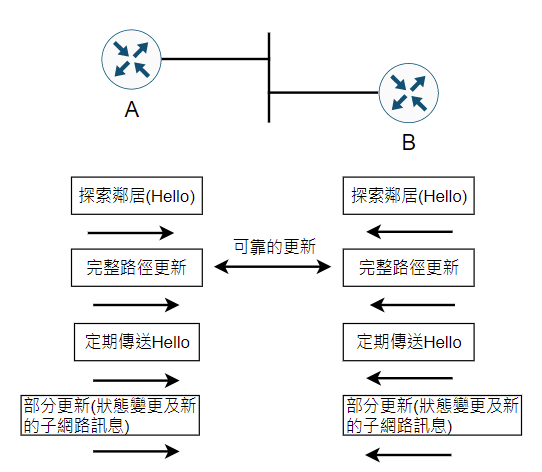
- 探索鄰居 : EIGRP 路由器藉由傳送Hello訊息來找出準鄰居EIGRP路由器,並檢查基本參數,已決定那些路由器可以成為鄰居
- 拓樸交換 : 當鄰居關係建立起來的時候,鄰居就會交換完整的拓樸更新,之後根據路由拓樸的異動,依需求進行部分的更新
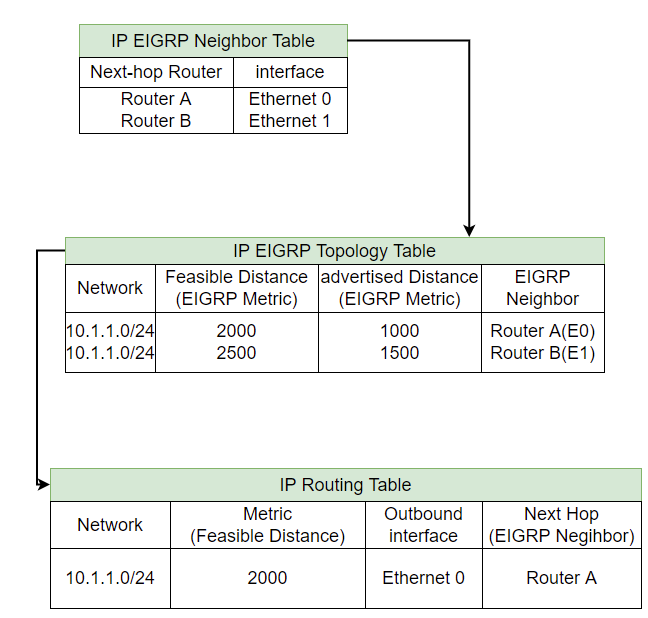
- 選擇路徑 : 每個路由器分析自己的EIGRP拓樸表,然後選出達每個子網路成本最低的路徑
EIGRP三張表
EIGRP Packet
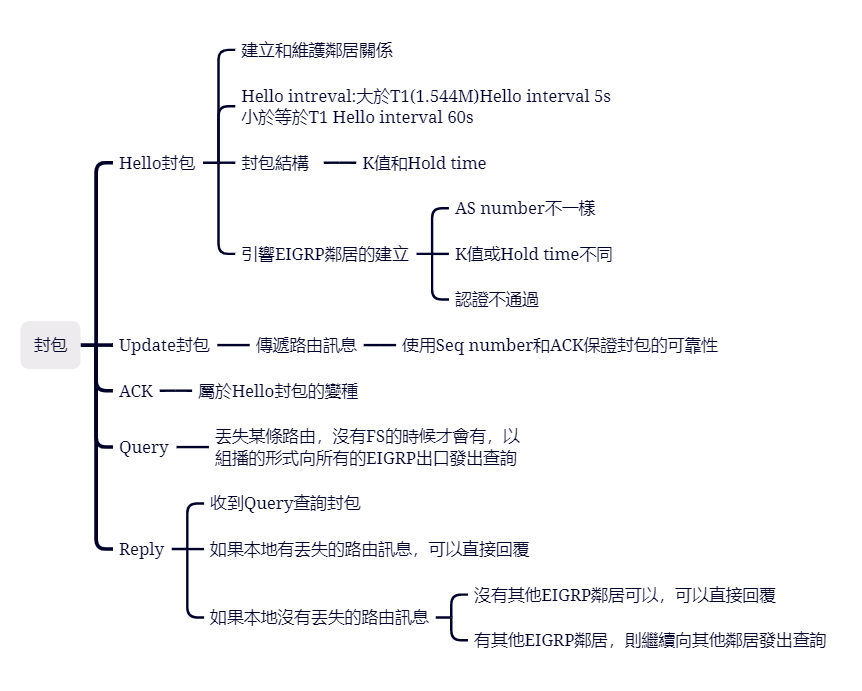
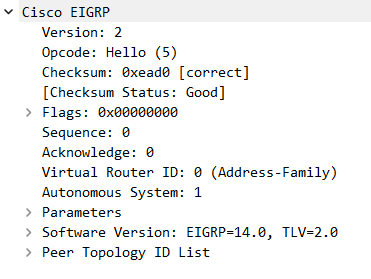
Hello : 確定和維護鄰居
- 維護發現鄰居

-
default Hello interval
-
發送hello間隔時間
-
對於低速T1線路以下為 60 秒,所有其他網絡為 5 秒
-
command
Router(config-if)#ip hello-interval eigrp as-number seconds
Router(config-if)#no ip hello-interval eigrp as-number [seconds]
-
-
default Hold interval
-
如果在這期間沒有收到hello就停止鄰居關係
-
對於低速T1線路以下,EIGRP Hold time為 180 秒,對於所有其他網路,EIGRP 保持時間為 15 秒。
-
command
Router(config-if)#ip hold-time eigrp as-number seconds
Router(config-if)#no ip hold-time eigrp as-number seconds
-
-
查看Hello interval 和 Hold interval
Router#sh ip eigrp interface detial f0/1
Cisco IOS並不會阻止Hold time比Hello time來的低,如果真的這麼做的話路由表會一下子出現,一下消失。
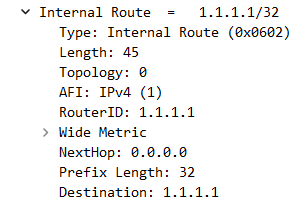
update : 傳送routing要更新
- 通常會傳送到224.0.0.10。重新傳送的時候,則是傳送給每個鄰居的單播IP地址

Query : 向鄰居請求routing的內容
- 當路由條目丟失且沒有FS可用時,EIGRP路由器向鄰居發送Queries
- 丟失路由條目會設置為active狀態,command顯示的狀態為P
- Queries被在所有啟用EIGRP的接口上,發送除Successor之外的所有EIGRP鄰居
- 如果EIGRP鄰居沒有關於丟失路由的訊息,Queries會被繼續發送給其他EIGRP鄰居
- 果路由器關於丟失路由的替代路由,將會回覆query
- 當收到整個分支網路的響應時,停止查詢
Reply : 回覆鄰居的routing內容請求
- 如果收到Query有丟失的路由訊息就會發送路由,如果沒有繼續以Query傳播下去
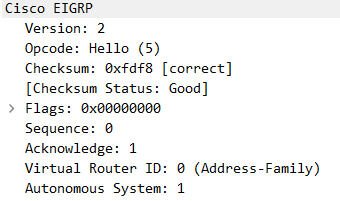
ACK : 回覆鄰居OK的封包
- 確認

DUAL
DUAL metric的計算最佳路由路徑

-
常有的介面頻寬和delay
type BW (kbps) delay (mesce) Serial 1544 20,000 GigEthernet 1,000,000 10 FastEthernet 100,000 100 Ethernet 10,000 1000 -
參數
-
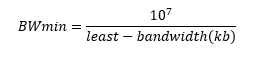
Bandwidth : 源和目的地之間最小的頻寬
-
Delay : 路徑上接口的累積延遲 10 microseconds(us)為單位
-
Reliablity : 源和目地之間最低可靠性,基於生存訊息
-
loading : 源和目地之間利陸上的最重附載,基於分組速率和接口配置的頻寬
-
MTU : 路徑上最小的MTU
-
EIGRP metric是32bit ,IGRP metric 是24bit,所以在計算EIGRP的時候要乘上256
-
-
計算公式

-
default k value 公式
\((10^7 Kbit/LeastBandwidth+delay)*256\)
-
default k value
-
k1 = 1 頻寬有關
-
k2 = 0 負載有關
-
k3 = 1 延遲有關
-
k4 = 0 可靠性有關
-
k5 = 0 MTU有關
-
k6 = 0
-
change K value command :
Router(config-router)#metric weights 1 0 1 0 1 -
查看K value
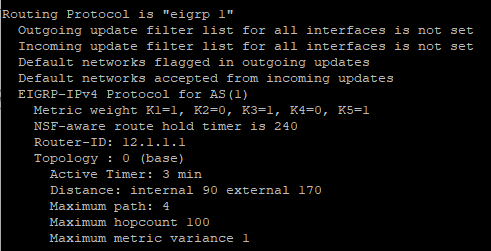
-
K value 不一樣的錯誤訊息

-
-
Example
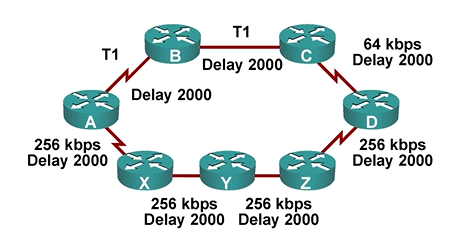
路徑 最小頻寬 total delay metric A → B → C → D 64 kbps 6000 (10^7/64)*256+(6000/10)*256 A → X → Y → Z → D 256 kbps 8000 (10^7/256)*256+(8000/10)*256
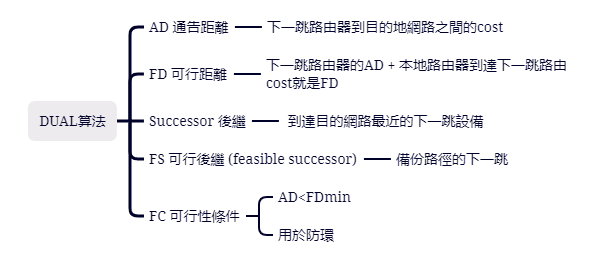
EIGRP Successor選舉
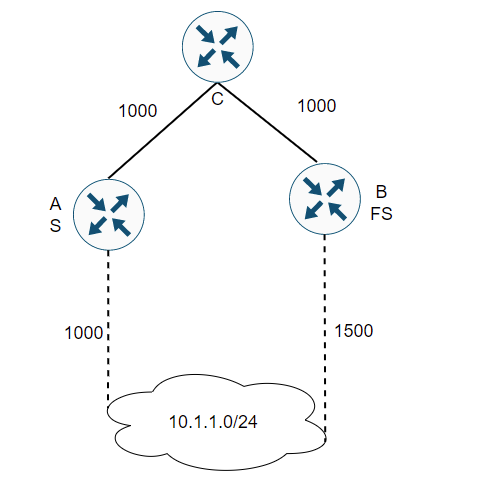
- 利用算完的metric數值當作AD或是FD,再來進行選舉
-
example
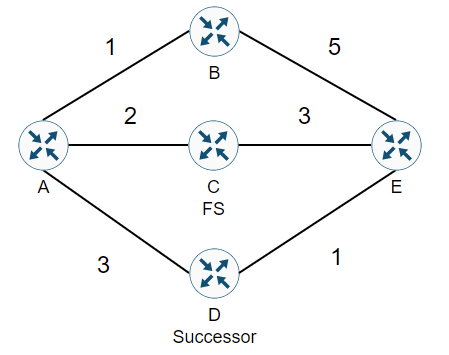
ABE ACE ADE AD 5 3 1 FD 6 5 4 這樣就可以看出來誰是Successor和FC,FC是看有哪個AD是小於4(FD)那個路由器就是FC
影響路由路徑
-
除了調整K值還有一些手段可以控制路路徑的產生
-
offset-list
- offset-list可以通過偏移量,讓路由器改變RD,或是FD數值,進而影響選舉
- 在某些情況,RD值沒有小於FD值沒有辦法,選舉出FS的時候可以利用這個方式改變FD值
EIGRP負載均衡
等價負載均衡
-
路由的metric等於最小的metric被裝入路由表
-
注意事項
- 可以手動修改附載均衡數目
- 默認是4條附載均衡路徑
- 設置成1表示不負載
-
command
Router(config-router)#maximum-paths <1-32>不一定是32要看IOS
不等價負載均衡

-
最小的Metric~最小Metric*V值
-
command
Router(config-router)#variance <multiplier>- multiplier的計算 = FS的FD除S的FD,假設FS的FD=30,S的FD=20,multiplier=1.5
- 打指令時因為無法輸入小數,所以要無條件進位,才能包含道FS附載均衡
-
example
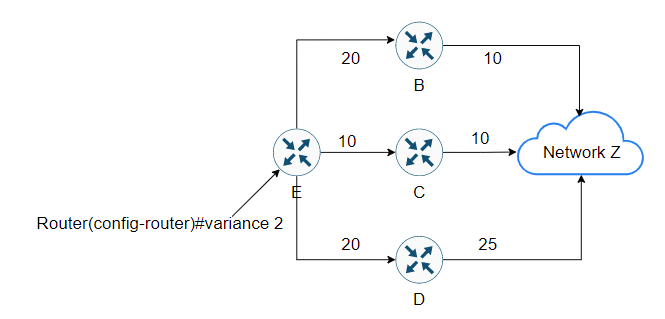
Network Neighbor FD AD Z B 30 10 Z C 20 10 Z D 45 25 -
Router E選擇Router C到達Nnetwork Z,因為最小FD=20,所以Router C是S
-
variance設定為2,Router E也會選擇Router B到達network Z
(20+10=30)<[2*(FD)=40], FDmin~V*FDmin
-
Router D不行參與,因為它並不是S或是FS
-
EIGRP加密認證
-
概念
- EIGRP只支持加密認證
- 路由器生成必檢查每個EIGRP封包
- 路由器驗證他接收到的每個更新的源
- 配置一個密鑰和密鑰的ID
- 每個參與認證的鄰居需要設定相同的密鑰
- 路由器產生一個消息摘要
- EIGRP使用key chain管理密碼
- 指定密鑰ID,密鑰和密鑰生存週期
-
command
-
進入key chain設定模式
Router(config)#key chain name-of-chain -
進入key id設定模式設定key id
Router(config-keychain)#key key-id -
定義key string(password)
Router(config-keychain-key)#key-string text
-
可選參數 :
指定何時啟用password
Router(config-keychain-key)#accpet-lifetime start time {infinite | end-time | duration seconds}可選參數 : 指定何時送密鑰封包
Router(config-keychain-key)#sned-lifetime start-time {infinite | end-time | duration seconds}
-
介面上啟動
Router(config)#interface Ethernet0/0
Router(config-if)#ip authentication mode eigrp 1 md5
Router(config-if)#ip authentication key-chain eigrp 1 TEST
-
-
Example
R1 key chain R2 key chain 可以形成鄰居嗎 key1=cisco key2=cisco 不可以 key1=cisco、key2=cisco key1=abcde、key2=cisco 不可以 key1=cisco、key5=cisco key2=cisco 不可以 key1=cisco、key2=12345 key1=cisco、key2=abcde 可以
Query產生的問題
Hub-and-spoke網路中的Query
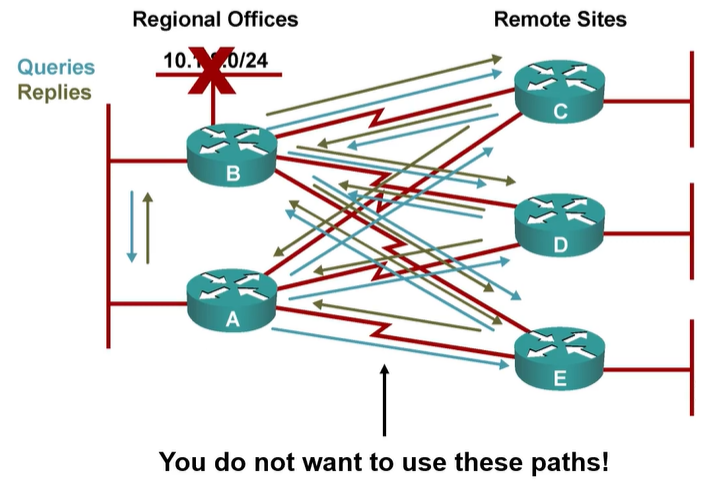
EIGRP Stub(EIGRP 末梢網路)
將C D E路由器設定為Stub以後的query封包流向
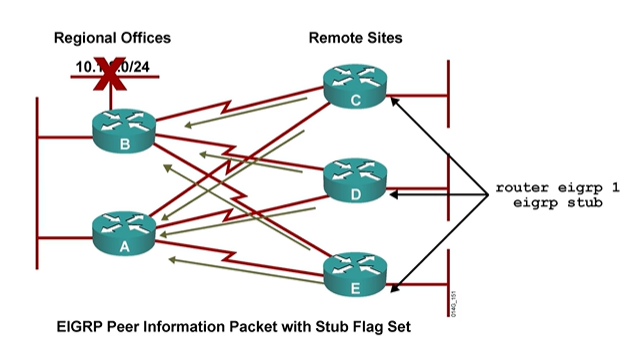
-
觀念
- 因為查詢過程封包和過程太過於複雜,所以cisco推出這個功能解決這個問題
- EIGRP Stub提高了網路的問定性,降低了資源利用率,並簡化了遠端路由器的設定
- 末梢路由器通常用於hub-and-spoke topology
- 末梢路由器發送一個特殊的對等體消息給所有鄰居,報告其狀態為stub路由器
- 鄰居不會向stub路由器發送任何的query消息
- 16重傳 : 向鄰居發送了需要確認的數據包,但沒有收到來自於鄰居的ACK時,路由器會將同樣的數據包重新傳遞給鄰居16次,16次後重新建立鄰居關係。
-
command
Router(config-router)#eigrp stub [receive-only | connected | static | redistributed | summary ]- 預設 connected summary 這兩個參數
- receive-only : 只會接收路由訊息
- redistributed : 重新翻譯成EIGRP形式的路由訊息在發布給其他鄰居跟static有關
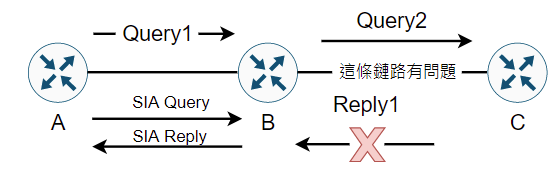
EIGRP SIA (stuck in active)
-
路由器鄰居收到所有的replies時,才重新計算丟失路由的Successor
-
預設情況下,如果任何鄰居未能在3min內回覆查詢,丟失的路由條目處於SIA狀態,路由器重置對於未能答覆的鄰居關係。
-
假設A上有條路由找不到所以發送Query訊息到B,B也找不到,所以發送給C,當C要傳送回覆訊息時,C→B有問題這時候會A會重傳16次,導致A跟B的鄰居關西解除,但是這樣不合理,因為A和B本身沒有問題
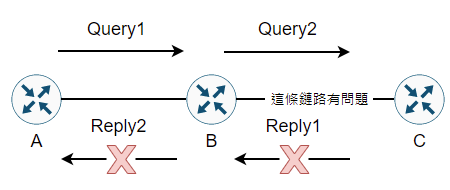
-
有SIA-replay的情況,B和C的鄰居關西就消失了,A和B會發送暫時的Query和Reply確定A和B的關係
Graceful shutdown
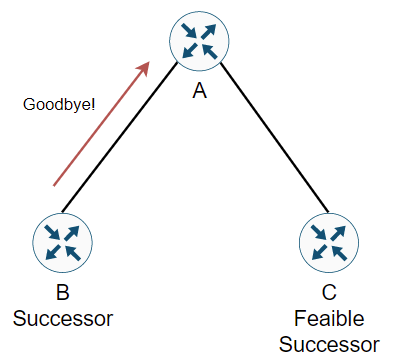
- 當介面從EIGRP網路中移除時,該介面發出goodbye訊息直接中斷鄰居關係,加速網路收斂
- 需要IOS 12.3或是更晚的版本才支持goodbye消息
- 發送goodbye訊息
- no network
- no router eigrp
- 不發送goodbye消息:
- 接口被關閉或是重啟路由器
Unicast EIGRP peering
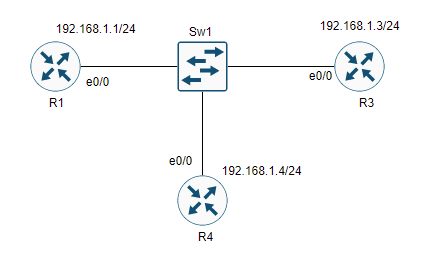
如果不想與R4建立鄰居,但是R1和R3需要建立鄰居,這時候就可以使用unicast peering,這個跟BGP的peer有點像,但是這個就會把組播功能停掉。
R1(config)#router eigrp 100
R1(config-router)#network 192.168.1.0
R1(config-router)#no auto-summary
R1(config-router)#neighbor 192.168.1.3 e0/0 (output interface)
R3(config)#router eigrp 100
R3(config-router)#network 192.168.1.0
R3(config-router)#no auto-summary
R3(config-router)#neighbor 192.168.1.1 e0/0
R4(config)#router eigrp 100
R4(config-router)#network 192.168.1.0
R4(config-router)#no auto-summary
Leak-map
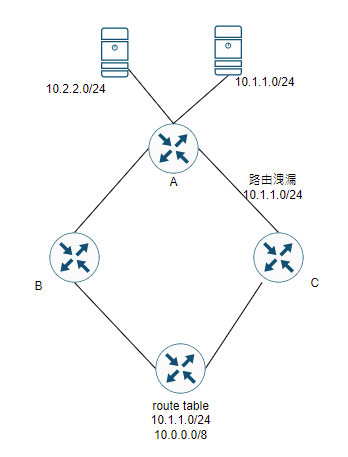
- 洩漏部分子網
假設有兩台server一個10.2.2.0/24,另一個10.1.1.0/24我今天想讓大家訪問到10.1.1.0的時候可以先C不走B這時候我就可以路由洩漏給C所以C就知道可以通過A→C這樣走,但是如果我今天訪問10.2.2.0/24裡面的Server就可以使用load balance。
-
example1
Router(config)#router eigrp 1 Router(config-router)#eigrp stub leea-map route-map -
example2
Router(config)#interface s0/0 Rtouer(config-if)#ip summary-address eigrp 1 10.0.0.0 255.0.0.0 leak-map route-map1 -
example3
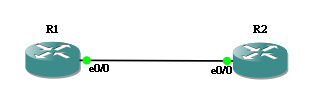
-
R1
interface Loopback0 ip address 10.1.1.1 255.255.255.0 ! interface Loopback1 ip address 10.2.2.2 255.255.255.0 ! interface Ethernet0/0 ip address 12.1.1.1 255.255.255.0 ip summary-address eigrp 1 10.0.0.0 255.0.0.0 leak-map A ! router eigrp 1 network 0.0.0.0 ! route-map A permit 10 match ip address 1 ! access-list 1 permit 10.1.1.0 -
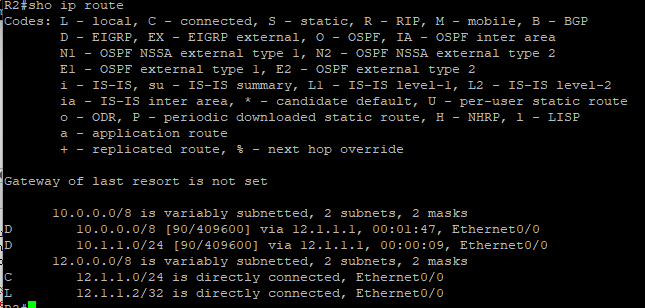
R2
做summary的時候就可以發現本應該summary 10.1.1.0被洩漏了
-
EIGRP configuration
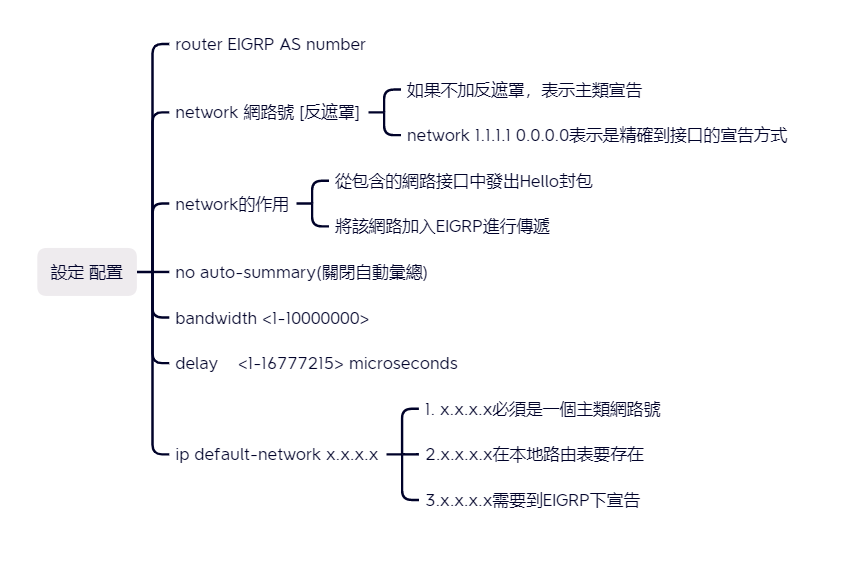
EIGRP基本
-
router eigrp autonmous-system-number
Router(config)#router eigrp autonmous-system-number- 設定EIGRP AS number
- 建立鄰居需要相同的AS number
-
network network-number [wildcard-mask] 需告
Router(config-router)#network network-number [wildcard-mask]-
wildcard-mask請至OSPF看
-
-
no auto-summary 關閉彙總
Router(config-router)#no auto-summary- 關閉自動彙總
- Pacing Time Un/Reliable : 用來確定不可靠/可靠列隊中封包被送出接口時間間隔
-
ip summary-address eigrp 手動彙總
Router(config-if)#ip summary-address eigrp as-number address mask AD-vaule- 接口產生路由匯總
- 彙總可以配置在網路內的任何一台路由器接口
- 在街口上設定路由彙總時,路由器會立即創建一條指向Null0接口的路由彙總,防止環路
- 當彙總的最後一條路由不存在時,彙總路由將被刪除
-
passive-interface 被動介面
防止非必要的Hello發出,也防止非法鄰居
Router(config-router)#passive-interface default 預設全部都是被動介面
Router(config-router)#passive-interface [interface] 被動介面啟用
Router(config-router)#no passive-interface [interface] 取消被動介面
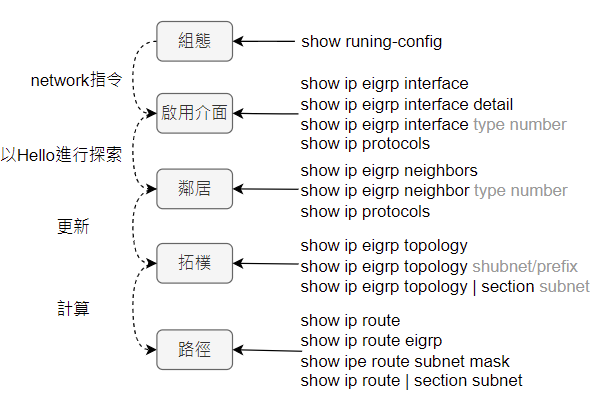
Show指令
-
sh ip eigrp neighbors
Router#sh ip eigrp neighbors
- Smoothed round trip time(SRTT)
- 發送EIGRP封包給鄰居,直到本地路由器接收到鄰居對該封包確認的平均時間,俗稱:平滑回程時間
- RTO
- 路由器在鄰居的重傳隊列中,重傳一個可靠封包的等待確認時間(ms),俗稱:重傳超時
- 16次重傳機制
- RTO ≥ 2*SRTT
- Smoothed round trip time(SRTT)
-
sh ip eigrp interfaces
Router#sh ip eigrp interfaces
- Xmit Quere Un/Reliable : 在不可靠/可靠隊獵中存留的封包數量
-
Router#sh ip eigrp topology
Router#sh ip eigrp topology
EIGRPv6
EIGRP IPv4 和 EIGRP IPv6比較
| 功能 | EIGPR IP4 | EIGRP IPv6 |
|---|---|---|
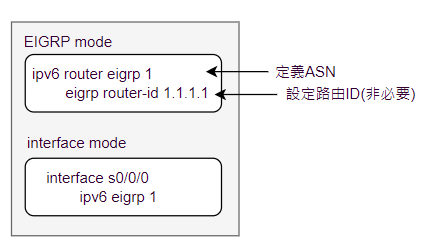
| 建立定義程序定義ASN | router eigrp as-number | ipv6 router eigrp as-number |
| 明確定義路由器ID (routing mode) | eigrp router-id number | 相同 |
| 更改共同路徑數目 (routing mode) | maximum-path number | 相同 |
| 設定差異值的倍數(routing mode) | variance multiplier | 相同 |
| 影響權值的計算 (interface mode) | bandwidth value delay value | 相同 |
| 更改Hello或是Hold interval (interface mode) | ip hello-interval eigrp asn time ip hold-time eigrp asn time | 將ip改成ipv6即可 |
| 在介面上啟動EIGRP | network ip-address [wildcard-mask] | ipv6 eigrp asn (interface mode) |
| 自動彙整 (routing mode) | [no] auto-summary | EIGRp IPv6不需要此功能 |
EIGRPv6 設定
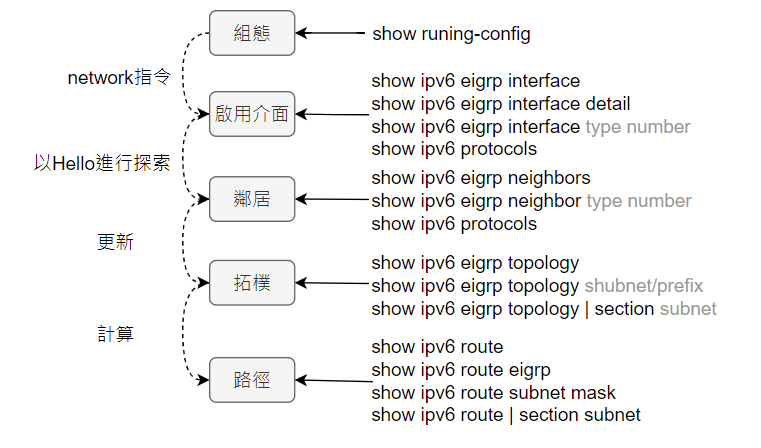
EIGRP IPv6和EIGRP非常相似,都是使用DUAL算法,也會選舉FS和Successor。EIGRP IPv6的設定很像OSPFv3的設定方式,也是在介面上啟用EIGRP IPv6,EIGRP IPv6權重設定一樣可以透過bandwidth和delay對介面進行設定
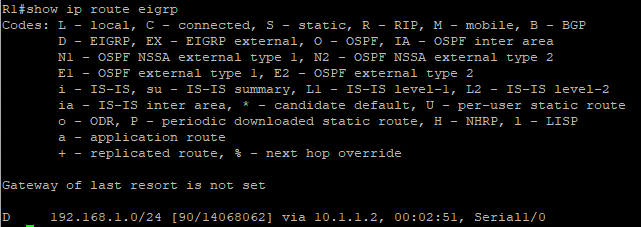
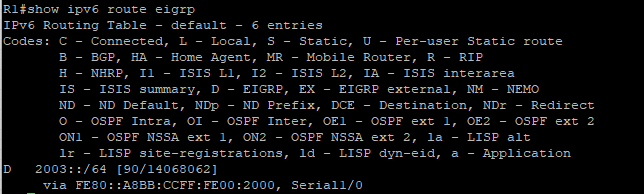
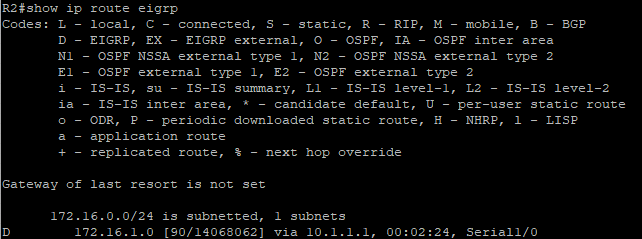
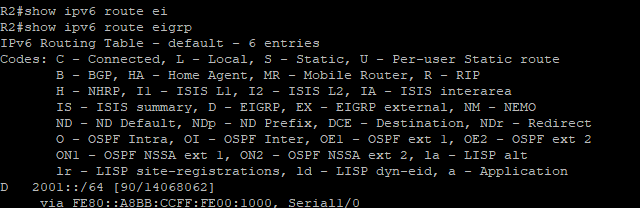
Show
case
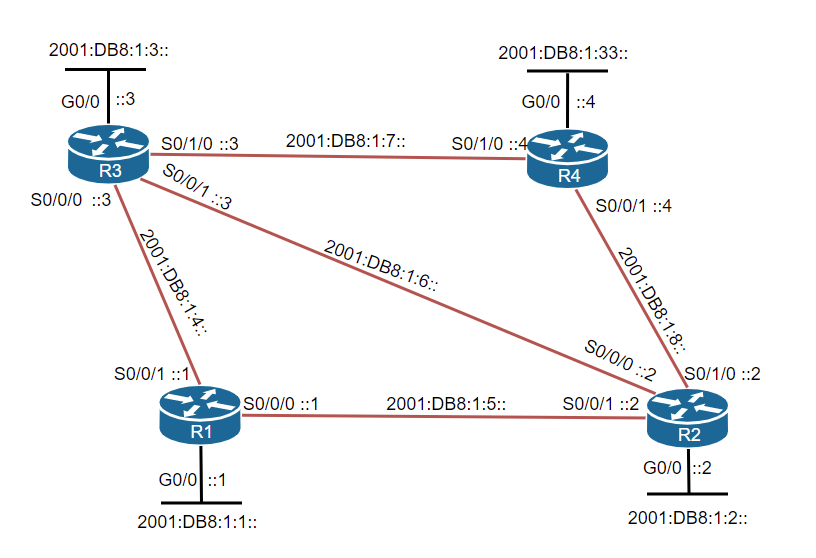
R1
ipv6 unicast-routing
!
ipv6 router eigrp 1
	eigrp router-id 1.1.1.1
!
interface g0/0
	ipv6 address 2001:db8:1:1::1/64
	ipv6 eigrp 1
!
interface s0/0/0
	ipv6 address 2001:db8:1:5::1/64
	ipv6 eigrp 1
!
interface s0/0/1
	descriptoin link to R3
	ipov6 address 2001:db8:1:4::1/64
	ipv6 eigrp 1
R2
ipv6 unicast-routing
!
ipvt router eigrp 1
	eigrp router-id 2.2.2.2
!
interface g0/0
	ipv6 address 2001:db8:1:2::2/64
	ipv6 eigrp 1
!
interface s0/0/0
	descriptoin link to R3
	ipv6 address 2001:db8:1:6::2/24
	ipv6 eigrp 1
!
interface s0/0/1
	description link to R1
	ipv6 address 2001:db8:1:5::2/64
	ipv6 eigrp 1
!
interface s0/1/0
	description link to R4
	ipv6 address 2001:db8:1:8::2/64
	ipv6 eigrp 1
EIGRP address family
Wide Metric
-
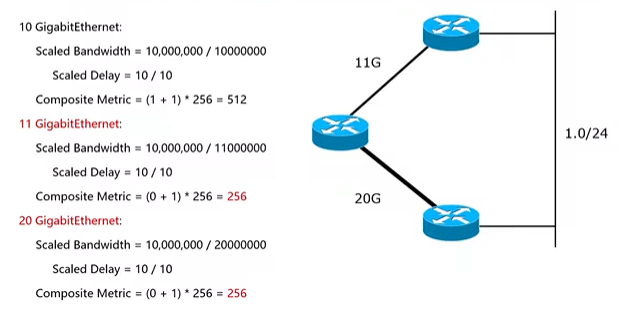
接口頻寬超過10G則Metric值固定為256,會導致不理向的等價負載均衡
-
EIGRP Wide Metric 使用 64-bit metric進行計算
-
傳統EIGRP的Metric為32-bit,最大Metric為 : 4294967296
-
64-bit Metric計算只能在命名模式的EIGRP中使用,傳統使用32-bit Metric
-
預設K值 :
- K1=1
- K2=0
- K3=1
- K4=0
- K5=0
- K6=0
- K6用於計算擴展屬性:抖動和能耗
- Jitter(抖動)—(單位 : us)
- 路由路徑中所有鏈路的累加,優選路由抖動最低的路徑
- Energy(能耗)
- 路由路徑中所有鏈路的累加,優選路由能耗最地的路徑
-
Metric原公式

-
預設K值公式

Minimum Throughput計算 和 Total Latency(總延遲)
- \(Minimum Throughput(BW)=10^7*65536/BW\)
- \(Latency=Delay*65536/10^6\)
- 取路徑上所有延遲,分別計算,然後取和
- 65535為計算的常數
- 接口頻寬≤1G時
- \(Latency=(delay(ps)*65536)/10\)
- 接口頻寬>1G時
- \(Latency=(10^7*65535/10)/BW\)
- 接口頻寬超過1G時,延遲將不能將不能被精確描述,故計算不在使用接口延遲
- 回環接口同樣適用(默認頻寬8G)
- 手動設定頻寬後,延遲會按照延遲的公式推導,不在使用接口默認參數
- 接口頻寬≤1G時
Metric version 64bit的情況
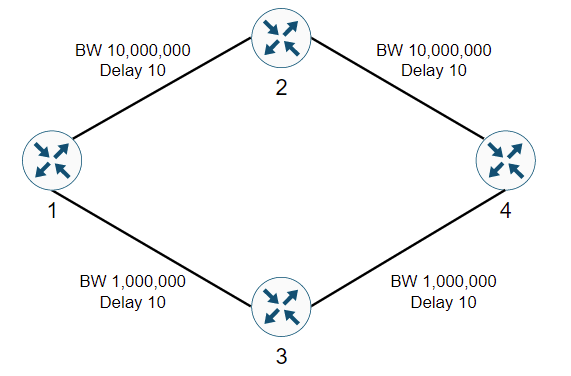
路徑1→2→4
\(Delay=10^7*10^6/BW=10^6\)
\(Latency=Delay*65536/10^6=65536\)
路徑1→3→4
\(Delay=10us*10^6=10^7ps\)
\(Latency=Delay*65536/10^6=655360\)
\(Troughput=10^7*65536/BW=655360\)
\(Metric=Latency+Troughput=1310720\)
Command
R(config)#router eigrp test
R1(config-router)#address-fmaily ipv4 [unicast] vrf vrf-name autonomous-system [AS-number]
Router(config)#router eigrp CCNP
Router(config-router)#address-fmaily ipv4 unicast autonomous-system <AS-number>
Router(configrouter-af)#network <x.x.x.x>
case
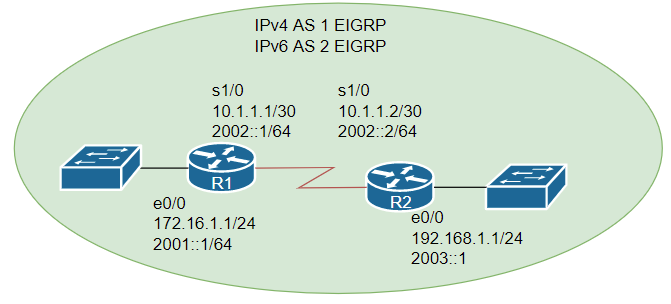
R1(config)#router eigrp R1DEMO
R1(config-router)#address-family ipv4 autonomous-system 1
R1(config-router-af)#af-interface default
R1(config-router-af-interface)#hello-interval 2
R1(config-router-af-interface)#hold-time 10
R1(config-router-af-interface)#passive-interface
!
R1(config-router-af)#af-interface s1/0
R1(config-router-interface)#no passwive-interface
!
R1(config-router-af)#topology base
R1(config-router-af-topology)#variance 2
!
R1(config-router-af)#network 0.0.0.0
!
R1(config-router)#address-family ipv6 unicast autonomous-system 2
!
R1(config-router-af)#topology base
R1(config-router-af-topology)#variance 2
R2(config)#router eigrp R2DEMO
R2(config-router)#address-family ipv4 autonomous-system 1
R2(config-router-af)#af-interface default
R2(config-router-af-interface)#hello-interval 2
R2(config-router-af-interface)#hold-time 10
R2(config-router-af-interface)#passive-interface
!
R2(config-router-af)#af-interface s1/0
R2(config-router-interface)#no passwive-interface
!
R2(config-router-af)#topology base
R2(config-router-af-topology)#variance 2
!
R2(config-router-af)#network 0.0.0.0
!
R2(config-router)#address-family ipv6 unicast autonomous-system 2
!
R2(config-router-af)#topology base
R2(config-router-af-topology)#variance 2