Cisco SPAN (Switch port Analysis) 簡介和使用方式
Cisco SPAN (Switch port Analysis) 簡介和使用方式的重點整理。
為什麼需要
假設下層交換設備有問題,可能需要網路分析器來收集資料,可以拓透過端口鏡射也就是SPAN,也就是說可以直接把某個switch port反射到某個主機進行分析,分析某個switch port傳出的數據。
SPAN分類
- local SPAN : SPAN來源與目的地均作路在本地交換機。來源或是多個port。
- remote SPAN : SPAN來源與目的地在不同的交換機上。鏡射資料流是金過特殊用途的vlan傳送到目的地交換機進行複製資料。
Local SPAN
可以支援etherchannel,但是要以portchannel介面指定SPAN,如果要監控多個VLAN,則可以指定VLAN當作SPAN來源,在來源VLAN所有的port都會變成來源,且不會引響原本的forwarding,因為SPAN來源或鏡射的資料會複製到SPAN目的port的egress queue。
頻寬問題,如果port很壅塞,鏡射的資料可能會,而不會從目的port傳出去,SPAN來源的資料超過SPAN目的port可能無法看到鏡射的資料。
可以支援的SPAN數量是由switch的型號而定的。
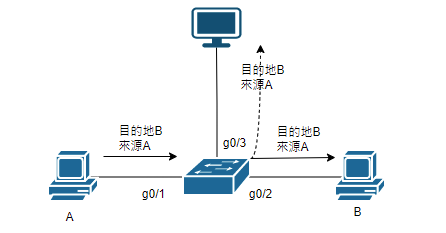
Local SPAN設定
-
設定SPAN session,指定SPAN session data來源
SW(config)#monitor session sessin-number source {interface type member/mod/num | vlan vlan-id } {rx | tx | both}- 如果需要多個SPAN來源編號可以重複使用
- 設定VLAN時需要物理界面,不是SVI
- 可以使用雙向的both,也可以只有接收rx,或是傳送tx
-
設定SPAN目的地
SW(config)#monitor session session-number destination interface type member/mode/num [encapsulation relicate]- 每個SPAN只可以指定一個目的地,不同SPAN不能分享共同目的地,必須使用物理界面。
- 通常不會複製L2的協定,STP,BPDUs,CDP,VTP,DTP,PAgP,如果要可以將上encapsulate replicate
-
以上面的圖
SW(config)#monitor session 1 source interface g0/1 both
SW(config)#monitor session 1 destination interface g0/3
Remote SPAN
RSPAN需要設定特殊用途的VLAN成為RSPAN VLAN,如果VTP server上設定RSPAN VLAN,VTP會傳播給其他Switch,如果不是使用VTP就要確保每個switch都有設定到,RSPAN VLAN也會被VTP pruning引響
-
設定RSPAN VLAN
SW(config)#vlan vlan-id SW(config)#remote-span -
設定source port and dest port
SW(config)#monitor session session-number source
{interface typemember/mode/num | vlan vlan-id} {rx | tx | both} }
SW(config)#monitor session session-number destination remote vlan rspan-vlan-id
show
show run | in monitor
show monitor