Cisco IP SLA (IP Service-Level Agreement) 使用方式和設定
Cisco IP SLA (IP Service-Level Agreement) 使用方式和設定的重點整理。
為什麼需要IP SLA
- 使用ping-echo檢測鏈路的是否連通,或是支持多種協定TCP,UDP檢測鏈路
- 通常要搭配local PBR來使用
- 早期是RTR來檢測,Cisco IOS也可以用rtr指令另設定RTR
- 在超過特定測試門檻可以產生SNMP trap
- 在超過特定門檻可以自動安排IP SLA test
- track IP SLA測是觸發HSRP
- 收集網路VoIP品質
支援協定
- DHCP
- TCP
- ICMP
- UDP
- DNS
- RTP (VoIP)
- HTTP
- FTP
command
Basic cmmand
| 命令 | 描述 |
|---|---|
| ip sla sla-ops-number | 啟動SLA |
| icmp-echo {destinatin-ip-address | destination-hostname} [source-ip {ip-address | hostname} | sources-interface interface-name] | 指定目的IP和來源IP或是介面 |
| frequency seconds | 發送packet頻率 (1s為單位) |
| ip sla schedulte sla-ops-number [life {forver | seconds}] [start-time {hh:mm[:ss] [month day] | [day month] | pending | now | after hh:mm:ss}][ageout seconds] [recurring] | 排成SLA的時間 |
| SW(config)#ip sla responder | ip sla responder預設是關閉的,也就是說沒有辦法回應 |
驗證MD5
SW(config)#key chain chaine-name
SW(config-keychain)#key key-number
SW(config-keychain-key)#key-string string
SW(config-keychain-key)#exit
SW(config-keychain)#exit
SW(config)#ip sla key-chain chain-name
設定步驟
-
在來源交換機設定新的IP SLA
SW(config)#ip sla operation-number -
設定運作類型
SW(config-ip-sla)#test-type parameters.............-
test-type : dhcp、dns、ethernet、ftp、http、icmp-echo、mpls、path=echo、path-jitter、slm、tcp-connect、udp-echo、udp-jitter
-
以icmp-echo為例
SW(config-ip-sla)#icmp-echo destination-ip-addr [source-ip-addr] -
udp-jitter
SW(config-ip-sla)#udp-jitter destination-ip-addr dest-udp-port [source-ip source-ip-addr] [source-port src-udp-port] [num-packets num-of-packets] 每隔幾毫秒發送幾個封包 [interval packet-interval] 每隔幾毫秒發送 -
udp-jitter VoIP
SW(config-ip-sla)#udp-jitter destination-ip-addr dest-udp-port codec {g711alaw | g711ulaw | g729a}愈
預設會以1000個封包每個封包格20ms
-
-
設定IP SLA 頻率
SW(config-ip-sla)#frequency seconds- 預設以60s為間隔
- 檢測存活時間
-
安排測試
SW(config-ip-sla)#ip sla schedulte sla-ops-number [life {forver | seconds}] [start-time {hh:mm[:ss] [month day] | [day month] | pending | now | after hh:mm:ss}][ageout seconds] [recurring]- life 設定 forever預設會以3600s執行一次
SHOW
-
可以看到ip sla的設定
show ip sla configuartion -
會顯示最近的測試報告
show ip sla [aggregated] [operation-number]
case
case R1檢測S1
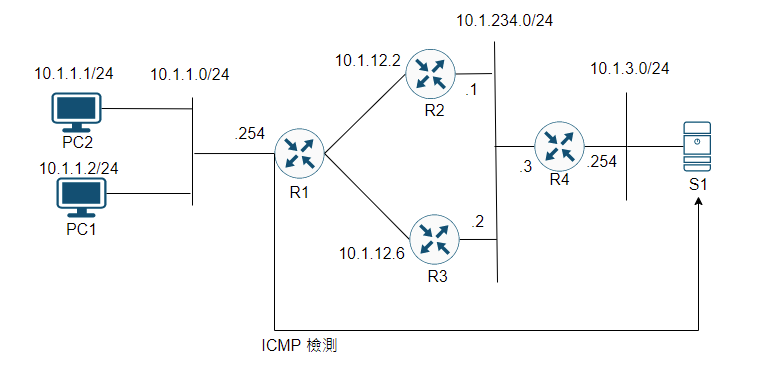
R1(config)#ip sla 11
R1(config-ip-sla)#icmp-echo 10.1.3.1 source-ip 10.1.1.254
R1(config-ip-sla)#frequency 60
R1(config-ip-sla)#exit
R1(config)#ip sla schedule 11 start-time now life forever
#route map
R1(config)#access-list 101 permit ip host 10.1.1.254 host 10.1.3.1
R1(config)#ip local policy route-map PC2-over-low-route
R1(config)#end
-
show ip sla configuration
R1#show ip sla configuration IP SLAs Infrastructure Engine-III Entry number: 11 Owner: Tag: Operation timeout (milliseconds): 5000 Type of operation to perform: icmp-echo Target address/Source address: 10.1.3.1/10.1.1.254 Type Of Service parameter: 0x0 Request size (ARR data portion): 28 Verify data: No Vrf Name: Schedule: Operation frequency (seconds): 60 (not considered if randomly scheduled) Next Scheduled Start Time: Start Time already passed Group Scheduled : FALSE Randomly Scheduled : FALSE Life (seconds): Forever Entry Ageout (seconds): never Recurring (Starting Everyday): FALSE Status of entry (SNMP RowStatus): Active Threshold (milliseconds): 5000 Distribution Statistics: Number of statistic hours kept: 2 Number of statistic distribution buckets kept: 1 Statistic distribution interval (milliseconds): 20 Enhanced History: History Statistics: Number of history Lives kept: 0 Number of history Buckets kept: 15 History Filter Type: None -
show ip sla statistics 11
R1#show ip sla statistics 11 IPSLAs Latest Operation Statistics IPSLA operation id: 11 Latest RTT: 14 milliseconds Latest operation start time: 07:44:34 UTC Tue Jun 21 2022 Latest operation return code: OK Number of successes: 13 Number of failures: 0 Operation time to live: Forever- 已經經過了13次的間隔,都成功,延遲時間RTT(round trip time)
track SLA
-
可以追蹤HSRP
SWA和SWB設定HSRP,共用gateway 192.168.1.1。SWA比SWB較高的優先權,所以是現在用的閘道,每5就去ping一次192.168.70.1的上層路由器如果路由器沒有反應就,減去30優先權。
SWA(config)#ip sla 10 SWA(config-ip-sla)#icmp-echo 192.168.70.1 SWA(config-ip-sla)#frequency 5 SWA(config)#ip sla schedule 10 life forver start-time now SWA(config)#track 1 ip sla 10 reachability SWA(config)#int vlan 10 SWA(config-if)#ip addr 192.168.1.3 255.255.255.0 SWA(config-if)#standby 1 priority 120 SWA(config-if)#standby 1 track 1 decrememnt 30 SWA(config-if)#standby 1 preempt SWA(config-if)#no sh -
路由追蹤
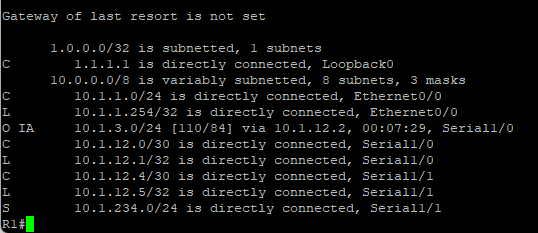
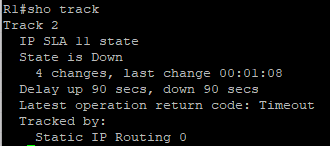
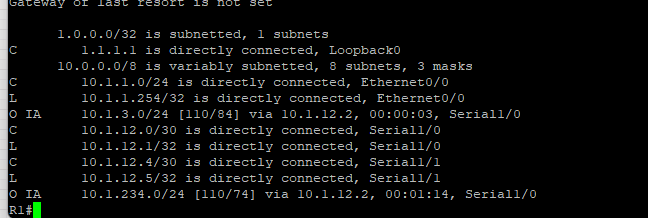
可以追蹤路徑假設R4設定ACL不允許R1 S1/1介面訪問或是某種原因讓,主要鏈路失效S1/1,就會將路由表自動刪除到背後,當這條鏈路回復時自己會在跑出來
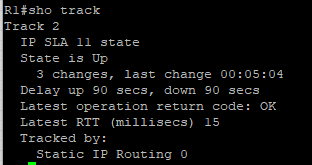
R1(config)#track 2 ip sla 11 state R1(config-track)#delay up 90 down 90 R1(config-track)#exit R1(config)#ip route 10.1.234 255.255.255.0 s1/1 track 2-
鏈路狀態OK時
-
鏈路不OK時
-